
Corsair
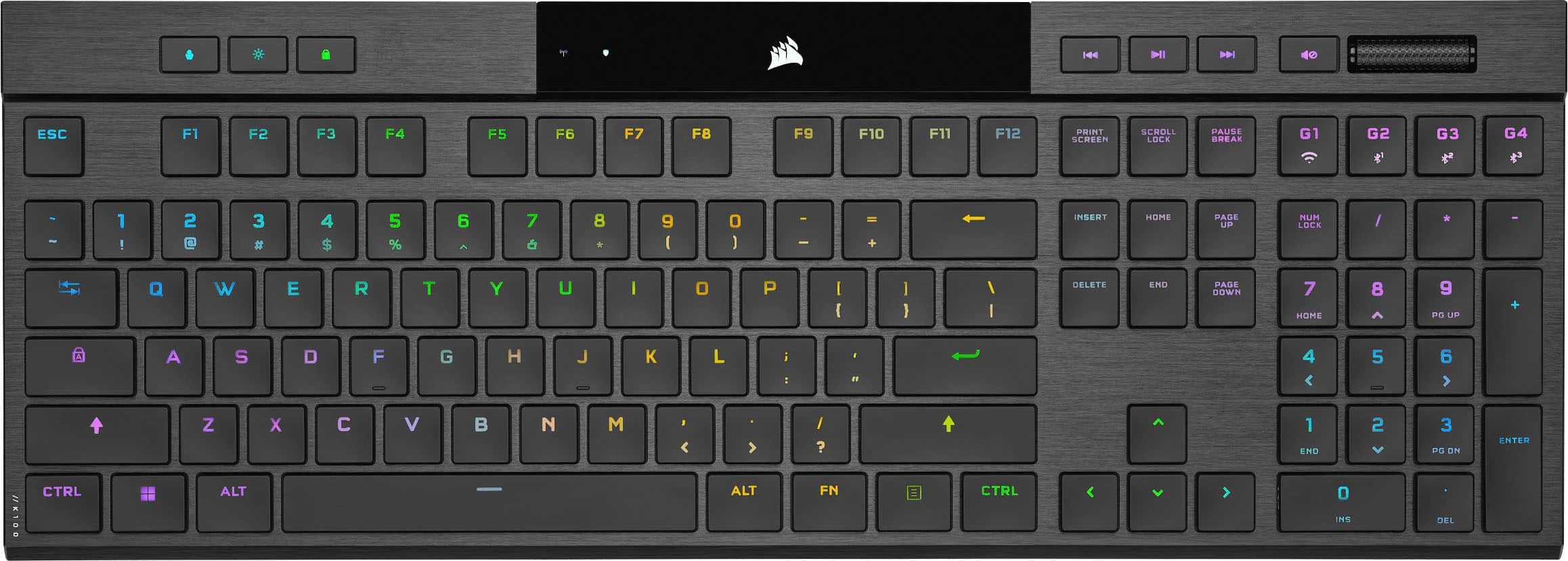
K100 RGB Optical-Mechanical Gaming Keyboard
Affiliate Disclosure: We may earn a commission when you buy through links on our site. This does not influence our editorial recommendations. Learn more about how we make money
Clara’s Verdict
Very GoodA gorgeous, feature-packed keyboard that's amazing if you need the customization, but most gamers will be happier spending less.
Best for: competitive gamers, streamers and content creators, keyboard enthusiasts, people who want maximum customization
Skip if: casual gamers, budget-conscious buyers, anyone who prefers wireless, people who like simple setup
Ethan’s Verdict
GoodA feature-packed flagship that charges flagship prices for incremental improvements and a steeper learning curve.
Best for: streaming enthusiasts, macro-heavy power users, RGB collectors
Skip if: budget-conscious gamers, casual typists, mechanical switch purists
Clara’s Pros & Cons
- +Lightning-fast OPX switches with 4000Hz polling rate for competitive gaming
- +Gorgeous aluminum design with premium keycaps and stunning per-key RGB lighting
- +Incredibly customizable with 200 profile storage and extensive macro support
- +Includes detachable wrist rest and useful control dial for adjustments
- −Expensive at $250, with limited value over cheaper alternatives
- −Wired-only design feels outdated for a premium keyboard
- −Large and heavy, takes up significant desk space
- −iCue software has a learning curve and Stream Deck integration is complicated
Ethan’s Pros & Cons
- +4000Hz polling rate is genuinely fast and four times standard.
- +Brushed aluminum build feels premium and durable.
- +200 profile storage and six macros offer serious customization.
- +Per-key RGB lighting is visually stunning.
- −OPX switches feel uncomfortable with excessive bottoming-out resistance.
- −iCUE and Stream Deck integration is confusing and requires two apps.
- −Wired only limits desk flexibility and portability.
- −$250 price tag is hard to justify over K95 XT alternatives.
Score Breakdown
Performance & Response9.012% wt
Comfort & Ergonomics7.520% wt
Build Quality9.015% wt
Features & Software7.015% wt
Customization8.512% wt
Wireless & Battery5.08% wt
Value6.018% wt
Score Breakdown
Performance & Response7.525% wt
Comfort & Ergonomics6.515% wt
Build Quality8.015% wt
Features & Software7.020% wt
Customization7.510% wt
Wireless & Battery5.08% wt
Value4.57% wt
Clara’s Full Review
A Beautiful Keyboard That Costs Like a Premium Phone
The Corsair K100 RGB is undeniably gorgeous. The brushed aluminum top panel, premium PBT keycaps, and per-key RGB lighting create a keyboard that looks like a luxury item sitting on your desk. If you care about aesthetics and want your gaming setup to look high-end, this keyboard delivers that showpiece appeal.
Where the K100 really stands out is performance and customization. The new OPX optical switches are genuinely fast, with a 4000Hz polling rate that's four times faster than standard keyboards. For competitive gamers, that speed advantage is real. You also get six dedicated macro keys, the ability to store 200 keyboard profiles, and a customizable control dial that lets you adjust settings without touching your mouse. If you're a streamer, content creator, or serious gamer who wants to automate everything, this keyboard can do it.
But here's the honest truth: most people don't need this. At $250, you're paying a significant premium, and reviewers consistently say the K95 RGB Platinum XT at $220 is the smarter choice for most gamers. The upgrades feel incremental rather than transformational. The OPX switches are fast, but they feel different from traditional mechanical switches and have surprising resistance when you bottom them out, which some people find uncomfortable. The iCue software offers extensive customization, but it has a learning curve, and if you want to use it with Stream Deck software for video production, you'll need both apps running simultaneously, which gets messy.
The keyboard is also large and heavy, taking up serious desk real estate. And it's wired-only in 2024, which feels like a step backward for a premium product.
So who should buy this? Keyboard enthusiasts who want maximum customization, competitive gamers who value every millisecond of speed advantage, and streamers who need advanced macro support. If that's you, the K100 is genuinely excellent and worth the investment.
For everyone else, save your money. The K95 RGB Platinum XT gives you 95% of what you need for $30 less. The K100 is a luxury item, not a practical choice.
Ethan’s Full Review
The Flagship That Costs Like One, Performs Like One, But Doesn't Feel Like One
Corsair's K100 RGB positions itself as the ultimate gaming keyboard. The spec sheet reads like a wish list: 4000Hz polling rate, OPX optical switches, 200 programmable profiles, six dedicated macro keys, per-key RGB customization, and a brushed aluminum chassis. On paper, it's everything a power user could want. In practice, it's a lesson in how premium pricing doesn't guarantee premium execution.
The OPX optical switches are the headline feature. At 4000Hz polling, they're legitimately four times faster than standard keyboards. But speed is only half the story. Users report surprising resistance when bottoming out, which feels jarring if you've used traditional mechanical switches. This isn't a minor quirk. It's the kind of tactile inconsistency that makes a keyboard feel "off" for hours until you either adapt or resent it. Corsair's trying to innovate, but innovation that divides opinion rather than improves experience is a red flag at this price.
The build quality is genuinely excellent. The brushed aluminum top panel and double-shot PBT keycaps feel luxurious and look the part. This keyboard will outlast most of its users' gaming careers. But premium materials don't justify a 25 percent price premium when the K95 RGB Platinum XT uses nearly identical construction and costs $30 less. You're paying for the name and the feature count, not for better durability.
The macro ecosystem is ambitious but broken. Six dedicated keys plus 200 profiles sounds incredible until you realize using Stream Deck functions requires running both iCUE and Stream Deck simultaneously. That's two separate applications fighting for your attention, two learning curves, and two potential failure points. The iCUE control wheel, positioned as a convenience feature, actually requires two fingers for accurate adjustments during gameplay. That's not convenient. That's a design flaw masquerading as innovation.
Wired-only connectivity is inexcusable in 2024. At $250, you should have wireless options or at least USB-C with a quality cable included. Instead, you get a tether that limits desk flexibility and portability. This isn't a technical limitation. It's a choice to cut costs while maintaining flagship pricing.
The real issue is positioning. Corsair is selling this as the ultimate keyboard, but it's really a niche product for streaming enthusiasts and macro-obsessed power users. For competitive gamers, the K95 XT delivers 95 percent of the experience at 88 percent of the price. For casual users, it's overkill. For keyboard enthusiasts, the OPX switches feel wrong. That leaves a very small audience willing to justify this cost, and even they should question whether the learning curve is worth it.
This keyboard isn't bad. It's competent, well-built, and feature-rich. But it's overpriced for what it delivers, and the execution on key features like the control wheel and Stream Deck integration undermines the premium positioning. At $200, this would be a solid recommendation. At $250, it's a hard pass when better alternatives exist.
Specifications
| macro keys | 6 dedicated |
| switch type | Corsair OPX Optical |
| backlighting | RGB |
| connectivity | Wired |
Overall Rating
Related Reviews
Keychron V3 Max vs Epomaker AK820 Pro vs Redragon K552 (2025)
Which mechanical keyboard wins? We compare Keychron V3 Max, Epomaker AK820 Pro, and Redragon K552 across typing feel, features, and value to find the best.
Keychron Q1 Pro vs ASUS ROG Strix Scope II 96 vs SteelSeries Apex Pro TKL
Which wireless mechanical keyboard wins? We compare Keychron Q1 Pro, ASUS ROG Strix Scope II 96, and SteelSeries Apex Pro TKL on build, performance, and value.
Wooting 60HE+ vs Razer BlackWidow V4 Pro vs Corsair K100 RGB (2024)
Which gaming keyboard wins? We compare Wooting's analog switches, Razer's feature-packed V4 Pro, and Corsair's flagship K100 to find the best.
Head-to-Head Comparisons
Alternatives Worth Considering
Review History
Initial review from real source data
Initial review from real source data
Editorial Independence
Our reviews are based on research from trusted expert sources. We may earn commissions from affiliate links, but this never influences our ratings or recommendations. How we score · Editorial policy · Report an error
Related Keyboards



Lowest Price Vendor Auto-Selected
Lowest Price Vendor Auto-Selected