
Logitech
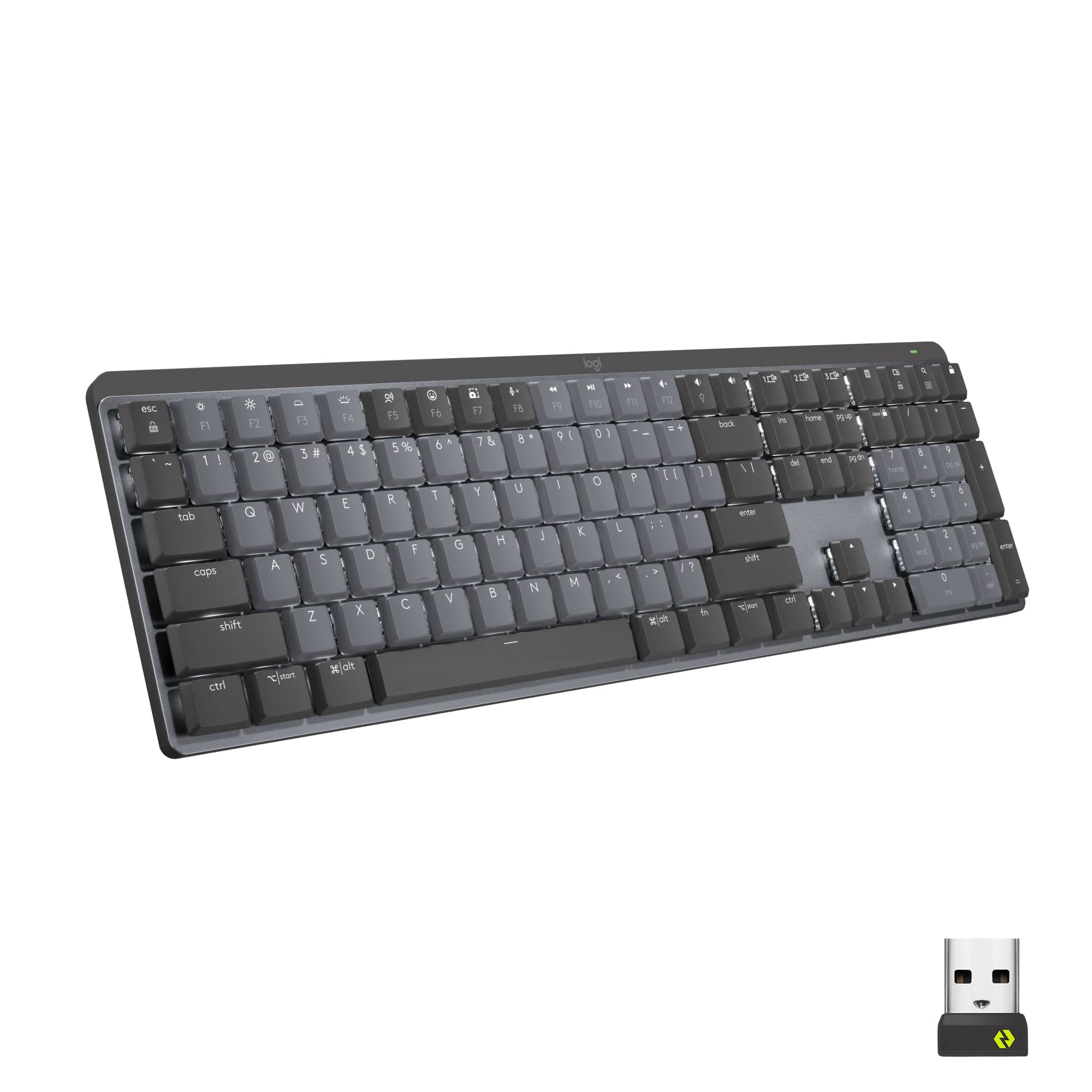
MX Mechanical Wireless Illuminated Performance Keyboard
Affiliate Disclosure: We may earn a commission when you buy through links on our site. This does not influence our editorial recommendations. Learn more about how we make money
Clara’s Verdict
ExcellentA comfortable, beautifully designed mechanical keyboard that makes typing feel like a joy, not a chore.
Best for: Busy professionals who type all day, Anyone upgrading from old membrane keyboards, People who use multiple devices and need easy switching, Logitech ecosystem users
Skip if: Budget-conscious buyers looking for the cheapest option, Gamers wanting RGB customization, People who need a wired keyboard option
Ethan’s Verdict
Very GoodA competent mechanical keyboard for office work that charges a premium without delivering enough differentiation to justify the $170 ask.
Best for: Logitech ecosystem loyalists, Multi-device users with Flow, Typing-focused professionals
Skip if: Budget keyboard shoppers, Gamers seeking high durability, Users needing wrist rest support
Clara’s Pros & Cons
- +Genuinely comfortable typing experience with quiet mechanical switches
- +Battery lasts 15 days, charges quickly via USB-C
- +Seamless switching between three devices with Logitech Flow
- +Professional design looks great on any desk
- −Doesn't include a wrist rest like some competitors
- −Switches aren't hot-swappable if you want to customize
- −Keycap legends can fade with heavy use over time
- −At $180, it's pricey for a non-gaming keyboard
Ethan’s Pros & Cons
- +Great typing feel with responsive, tactile switches
- +Seamless multi-device switching with Logi Flow
- +Excellent battery life and fast USB-C charging
- +Professional design that fits conservative workplaces
- −Thin keycaps that fade faster than expected
- −Incompatible with standard wrist rests, limiting ergonomics
- −Non-hot-swappable switches lock you into Logitech's choice
- −Priced $10 higher than Razer with lower durability specs
Score Breakdown
Performance & Response8.012% wt
Comfort & Ergonomics8.525% wt
Build Quality8.015% wt
Features & Software8.010% wt
Customization7.510% wt
Wireless & Battery8.510% wt
Value7.018% wt
Score Breakdown
Performance & Response8.019% wt
Comfort & Ergonomics7.514% wt
Build Quality7.514% wt
Features & Software8.019% wt
Customization7.014% wt
Wireless & Battery8.510% wt
Value6.510% wt
Clara’s Full Review
A Keyboard That Actually Makes You Want to Type
I love when a product just does what it's supposed to do really well, and that's exactly what reviewers found with the Logitech MX Mechanical. This isn't a gaming keyboard with flashy RGB lights. It's a straightforward, professional keyboard designed for people who spend their days typing emails, documents, and messages.
The biggest thing reviewers kept coming back to is how comfortable it is. The low-profile mechanical switches give you that satisfying tactile feedback without sounding like you're working in a newsroom from 1985. One reviewer scored 109 words per minute on a typing test and called the experience "speedy and comfy." That's the sweet spot for a productivity keyboard.
The design is understated and elegant. It's got a two-tone gray look with an aluminum top plate that feels professional enough for any office. At 1.8 pounds, it's substantial without being heavy. The 8-degree typing tilt means your wrists sit at a natural angle during those long work sessions.
Here's where it gets really practical: the battery life is genuinely impressive. You're getting 15 days with the backlight on, or 10 months if you turn it off. And if you forget to charge it, a quick 15-minute charge gives you a full day of use. For busy people juggling work and life, that's huge.
The Logitech Flow feature is another winner if you use multiple devices. Seamlessly switching between your laptop, tablet, and desktop without unplugging or reconnecting is exactly the kind of thing that makes your day feel less chaotic.
Now, the honest stuff: it's pricey at $180. The Razer Pro Type Ultra is $10 cheaper and includes a wrist rest, which this one doesn't. Some reviewers found the keycaps a bit thin, and the legends can fade with heavy use. You also can't swap out the switches if you want to customize them later, which limits your options.
But here's the thing, if you're upgrading from an old membrane keyboard and you spend most of your day typing, this keyboard will genuinely make your work feel better. It's not the cheapest option out there, but reviewers consistently called it a worthy investment for people committed to quality gear.
Ethan’s Full Review
A Competent Keyboard Fighting an Identity Crisis
Logitech's MX Mechanical arrives with a clear mission: bring mechanical switches to productivity users without gaming aesthetics. It mostly succeeds, but the execution has enough friction that the $170 price tag starts to feel like overreach.
The typing experience is genuinely good. Kailh Choc V2 switches provide tactile feedback with minimal spring force, making sustained typing sessions comfortable. Reviewers clocked 109 words per minute in testing without fatigue. The low-profile design and 8-degree typing tilt support proper wrist alignment. This is where Logitech nailed the brief.
Where things break down is the value calculation. You're paying $170 for a keyboard that's $10 more expensive than the Razer Pro Type Ultra, which includes a wrist rest and boasts 80 million keypress durability versus Logitech's 50 million. That's not a rounding error. That's Logitech charging premium dollars for midrange durability specs.
The keycap situation is worse. Reviewers report legends fade over time, which is unacceptable on a keyboard at this price point. Thin plastic keys don't scream quality. Neither does the lack of hot-swappable switches, which locks you into Logitech's switch selection permanently. Want to experiment with different tactile profiles? Too bad. Want to replace worn switches without replacing the entire keyboard? Not an option.
The software story is actually strong. Logi Options+ offers real customization: remappable top-row keys, cursor function reassignment, and seamless device switching via Logi Flow. If you're already in the Logitech ecosystem with an MX mouse and other peripherals, that integration has tangible value. But reviewers explicitly flagged that if you're not committed to the ecosystem, there are more affordable alternatives with similar functionality.
Battery life is excellent. Fifteen days with backlighting, ten months without. USB-C charging with a 15-minute quick-charge for a day's use is modern and practical. That's one of the few areas where Logitech doesn't cut corners.
Here's the core problem: this keyboard tries to be premium but cuts corners on durability, keycaps, and customization. It's not expensive enough to be a luxury item, but it's too expensive to be a value play. The Razer Pro Type Ultra at $160 offers better durability and includes a wrist rest. The Akko 3098B offers wired mode and more versatility. Budget mechanical keyboards at $80-120 deliver similar typing feel without the Logitech tax.
The MX Mechanical is a good keyboard for people already committed to Logitech's ecosystem. For everyone else, it's a hard sell at $170.
Specifications
| switch type | Tactile Quiet |
| backlighting | White LED |
| battery life | 15 days |
| connectivity | Bluetooth, USB Receiver |
Overall Rating
Related Reviews
Keychron V3 Max vs Epomaker AK820 Pro vs Redragon K552 (2025)
Which mechanical keyboard wins? We compare Keychron V3 Max, Epomaker AK820 Pro, and Redragon K552 across typing feel, features, and value to find the best.
Keychron Q1 Pro vs ASUS ROG Strix Scope II 96 vs SteelSeries Apex Pro TKL
Which wireless mechanical keyboard wins? We compare Keychron Q1 Pro, ASUS ROG Strix Scope II 96, and SteelSeries Apex Pro TKL on build, performance, and value.
Wooting 60HE+ vs Razer BlackWidow V4 Pro vs Corsair K100 RGB (2024)
Which gaming keyboard wins? We compare Wooting's analog switches, Razer's feature-packed V4 Pro, and Corsair's flagship K100 to find the best.
Review History
Initial review from real source data
Initial review from real source data
Editorial Independence
Our reviews are based on research from trusted expert sources. We may earn commissions from affiliate links, but this never influences our ratings or recommendations. How we score · Editorial policy · Report an error
Related Keyboards



Lowest Price Vendor Auto-Selected
Lowest Price Vendor Auto-Selected