
Keychron
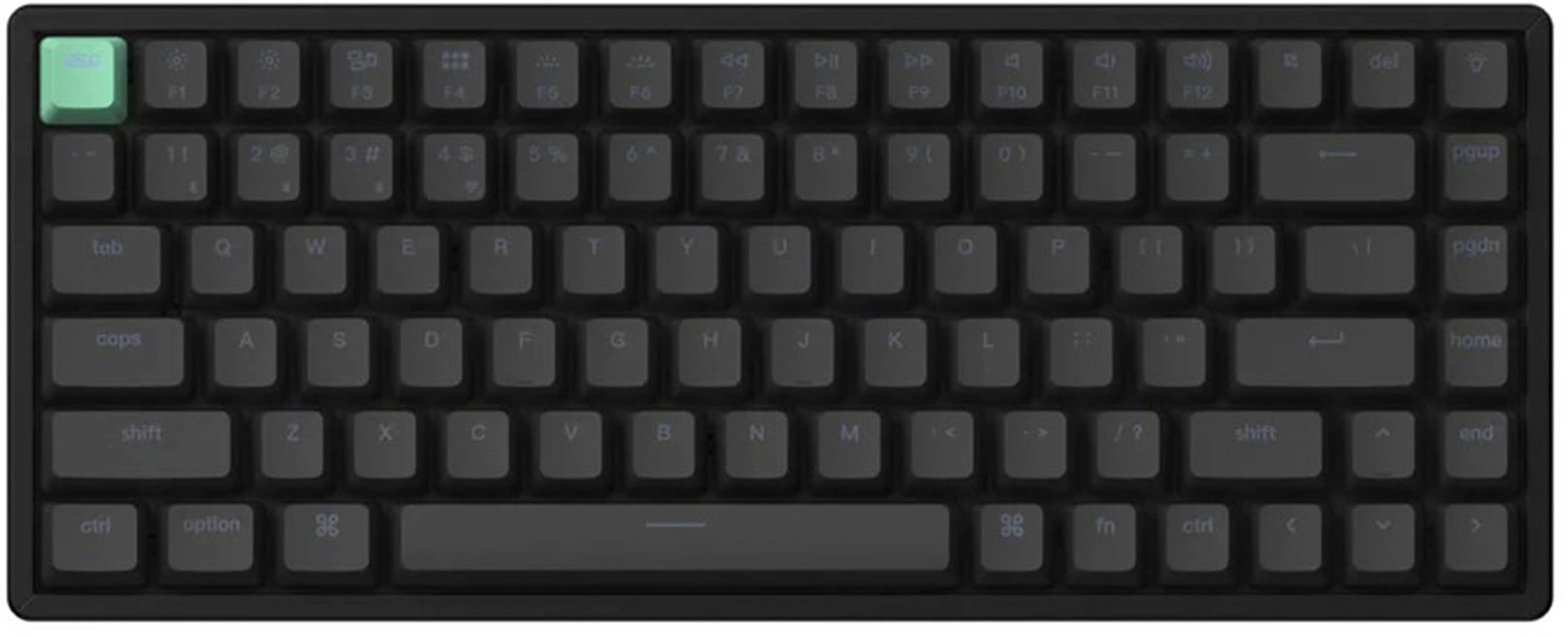
K2 Wireless Mechanical Keyboard
Affiliate Disclosure: We may earn a commission when you buy through links on our site. This does not influence our editorial recommendations. Learn more about how we make money
Clara’s Verdict
ExcellentFor under $80, you get a beautiful compact mechanical keyboard that actually works across all your devices.
Best for: work from home parents, students, anyone tired of laptop keyboards, budget-conscious tech lovers
Skip if: people who need silent typing, those wanting tons of customization
Ethan’s Verdict
Very GoodSolid budget option, but Gateron Browns are loud enough to make you regret the office placement.
Best for: budget-conscious remote workers, casual typists, travel use
Skip if: office environments, shared spaces, users seeking quiet switches
Clara’s Pros & Cons
- +Gorgeous RGB lighting that actually looks premium
- +Wireless and wired options give you flexibility
- +Compact size is perfect for small desks
- +Feels like a $200 keyboard but costs $80
- −The keys are definitely on the noisier side
- −Can't swap switches or deep customize
- −Not the quietest for open offices
Ethan’s Pros & Cons
- +72-hour battery life is genuinely practical
- +Wireless and USB-C dual connectivity works reliably
- +Affordable price makes it accessible to most buyers
- +Compact 75% layout saves desk space
- −Gateron Browns are loud, unsuitable for shared spaces
- −No software customization or key remapping available
- −Limited switch options lock you into one feel
- −ABS keycaps shine quickly with regular use
Score Breakdown
Performance & Response8.010% wt
Comfort & Ergonomics8.025% wt
Build Quality7.515% wt
Features & Software7.510% wt
Customization6.510% wt
Wireless & Battery8.510% wt
Value9.020% wt
Score Breakdown
Performance & Response7.020% wt
Comfort & Ergonomics7.515% wt
Build Quality7.015% wt
Features & Software6.520% wt
Customization6.015% wt
Wireless & Battery8.010% wt
Value8.55% wt
Clara’s Full Review
A Keyboard That Actually Gets It
Here's the thing about the Keychron K2: it proves you don't need to spend $150+ to get a keyboard that makes you happy. At under $80, this little compact mechanical keyboard punches way above its price point.
The design is what gets me first. It's small enough to fit on literally any desk, but it doesn't feel cramped when you're actually typing. The 75% layout means you still have your arrow keys and function row, which matters way more than people think. And that RGB lighting? It looks genuinely beautiful. You can customize the colors to match your vibe, whether that's calming blues for work or something fun and colorful.
Typing on the Gateron Brown switches feels really satisfying. They're tactile without being too clicky, and reviewers consistently say the keyboard keeps up with fast typing. If you've been stuck with a laptop keyboard or a cheap rubber dome keyboard, this will feel like a massive upgrade. The keys have actual travel and feedback, which makes typing feel intentional and responsive.
The wireless connectivity is the cherry on top. It connects via Bluetooth to basically anything, and you can also plug it in with USB-C if you want a wired connection. The battery lasts about 72 hours, so you're not constantly charging it. Perfect if you move between your desk, the couch, and coffee shops.
Now, the honest part: it's not silent. The keys make a noticeable clicking sound, which is pretty normal for mechanical keyboards but worth knowing if you're in a shared workspace or recording videos. And if you're the type who loves tinkering with keyboards, swapping switches, or diving deep into customization, this isn't your board. It's pretty locked down compared to premium mechanical keyboards.
But for everyday people who want a keyboard that feels great, looks beautiful, connects wirelessly, and doesn't cost a fortune? This is it. It's the kind of purchase where you'll use it every single day and never regret spending the money.
Ethan’s Full Review
The K2 is a Budget Win, But That Noise Problem is Real
Keychron's K2 sits at an interesting price point where it's cheap enough to overlook its limitations, but loud enough that you'll hear them constantly. At $79.99, you're getting a wireless mechanical keyboard with solid battery life and reliable connectivity. That's the good news. The bad news is that Gateron Brown switches are inherently noisy for a tactile switch, and there's no way to change them without desoldering.
Let's be clear about what this keyboard is: a budget wireless option for people who don't share their workspace. If you're in an office, a coffee shop, or anywhere near other humans, the noise becomes a liability. The switch choice here is a cost-cutting decision, and it shows. A quieter tactile option would have pushed the price up maybe $10, but Keychron went with volume instead.
The 75% layout is genuinely practical for space-constrained desks. You get arrow keys and most of the function row without the sprawl of a full-size board. The plastic frame is stable, the Bluetooth pairing works without drama, and 72 hours of battery life means you're charging maybe once a week. That's solid execution on the wireless side.
But here's where Keychron cuts corners: there's zero software support. You can't remap keys, adjust RGB lighting beyond basic modes, or create macros. If you want to customize this keyboard, you're either stuck with the defaults or you're soldering. That's a real limitation at any price, but it stings more when you realize other $80 keyboards offer basic remapping.
The keycaps are ABS plastic, which will start to shine after a few months. The stabilizers are proprietary, so you can't swap them out without special tools. The build quality is what you'd expect for the price: functional, not durable.
So here's the business case: if you work alone, travel frequently, and don't mind tactical noise, the K2 is genuinely good value. You're getting wireless connectivity and mechanical switches for under $80. That's hard to beat. But if you're looking for a quiet keyboard or any level of customization, this isn't it. There are better options in the same price range that don't make you choose between budget and usability.
Specifications
| layout | Compact 75% |
| switch type | Gateron Brown |
| backlighting | RGB |
| battery life | 72 hours |
| connectivity | Bluetooth, USB-C |
| compatibility | Windows, macOS |
Overall Rating
Related Reviews
Keychron V3 Max vs Epomaker AK820 Pro vs Redragon K552 (2025)
Which mechanical keyboard wins? We compare Keychron V3 Max, Epomaker AK820 Pro, and Redragon K552 across typing feel, features, and value to find the best.
Keychron Q1 Pro vs ASUS ROG Strix Scope II 96 vs SteelSeries Apex Pro TKL
Which wireless mechanical keyboard wins? We compare Keychron Q1 Pro, ASUS ROG Strix Scope II 96, and SteelSeries Apex Pro TKL on build, performance, and value.
Wooting 60HE+ vs Razer BlackWidow V4 Pro vs Corsair K100 RGB (2024)
Which gaming keyboard wins? We compare Wooting's analog switches, Razer's feature-packed V4 Pro, and Corsair's flagship K100 to find the best.
Review History
Initial review from real source data
Initial review from real source data
Editorial Independence
Our reviews are based on research from trusted expert sources. We may earn commissions from affiliate links, but this never influences our ratings or recommendations. How we score · Editorial policy · Report an error
Related Keyboards



Lowest Price Vendor Auto-Selected
Lowest Price Vendor Auto-Selected